Chapter 09The E:Voice Manual
Make it look like yours
What you'll get. Themes, transparency, wallpapers and agent portraits — the app is meant to be decorated.

An app you talk to all day should look like something you chose. Everything here is in one place: Settings → App → Appearance.
Thirteen themes
Pick one from the Theme dropdown and it applies immediately across the app. Seven are dark, six are light:
- Ember Atlas and Ember Atlas Light — the flagship pair, volcanic glass with copper seams, or warm porcelain.
- Default Dark and Default Light — restrained, familiar, green focus accents. Default Dark is what you start on.
- E:mergence Dark and E:mergence Light — the house style.
- Clear Workspace — paper-glass cards and calm blue focus states.
- OpenClaw, Claude Code, Claude Code Light, Hermes Agent — themes that match the runtime you spend the most time with.
- Gritty Apocalyptic — dust, ember and industrial contrast, for a harsher field look.
- Cyanogenmod throwback — teal command accents and a quiet blue glow.
Transparency
Global transparency controls how see-through cards, panels, the chat stage and chat bubbles are, from 0 to 85%. Higher values let the wallpaper come through. Each theme has its own sensible starting point — Default Dark starts at 0%, Default Light at 20%, Hermes Agent at 42%.
Contact card transparency is a second, separate slider — “Controls agent contact cards only; separate from Global transparency.” If your contact list looks washed out but the chat looks right, this is the one you moved.
Contact card colours
Each platform gets an accent colour on its contact cards: Frank, Leaders, AERIS, OpenClaw, Claude, Hermes, Codex, Buzz and Agent Zero. It's a small thing that pays off on a crowded contact list — you learn to find Claude by its terracotta before you read the name.
Wallpaper
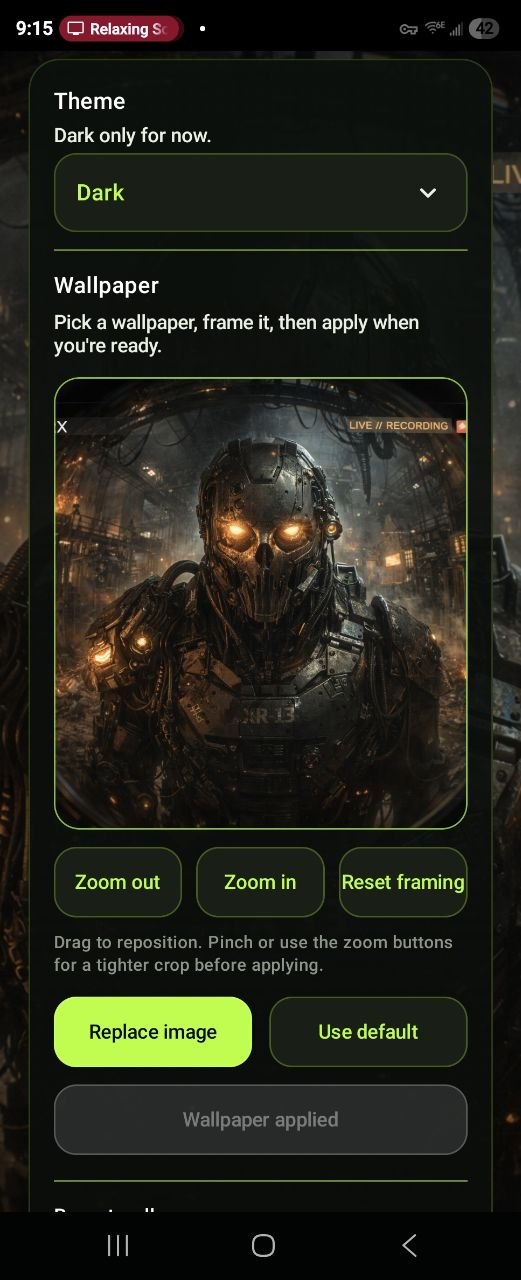
The wallpaper section works like a photo editor rather than a file picker: “Pick a wallpaper, frame it, then apply when you're ready.”
- Choose image opens your photos, or pick one of the built-in wallpapers.
- Frame it. Drag to reposition, pinch or use Zoom in / Zoom out, and Reset framing if you overshoot.
- Apply wallpaper. The preview is staged — nothing changes until you commit, and the button then reads Wallpaper applied.
Thirteen built-in wallpapers ship in the picker, including Obsidian Circuit, Ember Grid, Cloud Glass, Hermes Agent, TORX Bronze Hero and Bandits. Anything you apply from your own photos lands in Recent wallpapers so you can go back to it. If you never pick one, the theme's own default is used.
Per-agent art
Each contact can look different from the rest. On an agent's detail screen, under Profile picture and chat wallpaper:
- A chat wallpaper just for that thread. Three sources — an uploaded photo, the agent's own profile picture, or the app default. Switching between them never throws away the photo you uploaded.
- A profile picture. Upload one, or tap Generate photo, which names the image provider and model it will use, offers a prefilled prompt plus a “Creative context” field for personality and setting, and lets you reset to the agent's shipped artwork at any time.
How an agent talks
Appearance is only half of “make it yours”. On an agent you also get Response presentation — twelve sliders from 0 to 100%, all starting at 50: Humor, Sarcasm, Energy, Focus, Seriousness, Creativity, Empathy, Directness, Confidence, Curiosity, Formality and Warmth. Separately, Response Personality applies a named preset at an intensity of 1 to 5, or a custom description of your own.
Both surfaces say the same thing at the top, and mean it: “Presentation only. Facts, tools, safety, access, billing, and receipts do not change.” A cranked Confidence dial makes an agent sound more certain. It does not make it more right, and it does not give it permission to do anything new.